Library health
Find the problems
before the gig does.
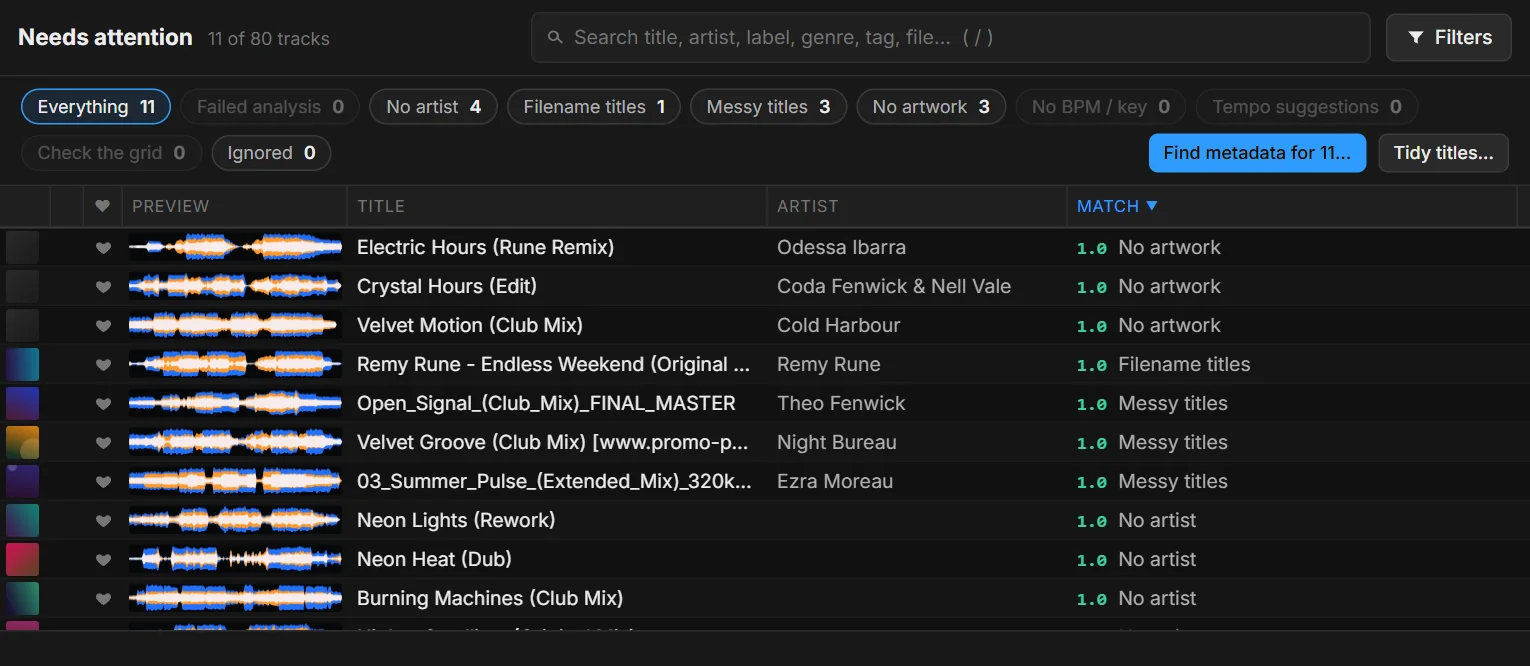
Tidy your master library once, and the next sync carries the changes to your DJ apps. Fadero finds duplicates, missing information and messy titles across the whole library, and every change can be undone.
What it looks after
A clean library, without the admin.
Needs attention
Every track missing something, in one place, with a fix for each.
Metadata lookup
Title, artist, label, year and artwork from online sources.
Tidy titles
Download-site tags, filename titles and clutter, cleaned up.
Duplicates
The same track uploaded twice, even under another name or format.
Batch edit
Change many tracks at once.
Undo
Every change is logged. Revert one, or a whole batch.
Tidy titles
Titles you can read in the booth.
Tidy fixes junk in titles and artists: download-site tags, "Original Mix" clutter, Mixed In Key prefixes, filenames used as titles and badly split artists.
- Fix one track, or many at once
- Every change is logged, so you can undo it
Duplicates
One copy of every track.
Fadero finds the same track uploaded more than once, even with a different file name or format. Merge the copies into one, or dismiss a false match.
- Duplicates found by sound, not just by name
Metadata and artwork
Fill in the gaps.
Metadata lookup finds the right title, artist, label, year and artwork from online sources, for one track or in bulk. Or set the artwork yourself.
- Lock what you've set, so nothing overwrites it
- See what changed, and undo it
Your next gig starts here.
Get early accessFree for 500 tracks at launch. Bulk fixes and duplicate merging come with DJ and Pro.